

Buzz
buzz.space.enable runs this same relay with a platform-held owner key (no nsec to copy), keeps the members in line with your app's seats, and publishes a ready chat page. This page covers the raw relay.Buzz is the Nostr relay for your app. Clients open a websocket, AUTH (NIP-42), and exchange events. You turn it on from the site (apphost.addon.apply). You do not install a relay, Redis, or object storage yourself.
What Buzz is (and is not)
| Buzz is | Buzz is not |
|---|---|
A ready Nostr relay at wss://buzz-<slug>.orkestia.dev | The website at <slug>.app.orkestia.dev |
| Relay + Redis + MinIO, applied together | A hosted HTTP Chat Relay or agent session API |
Owner AUTH with a signing key you hold (nsec) | An org Members invite |
| Postgres via the site's App Data instance | A second database, Neon, or in-cluster Postgres |
If your product stores conversations for signed-in app users, declare tables (often with ordered append and membership) and expose them. Buzz does not replace that.
Why Buzz
A hosted website is enough for pages and forms. It is not enough when:
- a Nostr client must stay reachable after the tab closes;
- several clients must see the same live event stream;
- you need media next to that stream;
- you do not want to run Nostr infrastructure.
| Without Buzz | With Buzz |
|---|---|
| You host a websocket yourself, or agents only work while a laptop is open | The relay stays up on the site's always-on Machine |
| Auth, cache, and media are three more projects | Relay, Redis, and MinIO are applied together |
| A static zip and a live socket fight over the same URL | The website stays on <slug>.app.orkestia.dev; Buzz lives on buzz-<slug>.orkestia.dev |
Postgres is not part of the Buzz install. The relay uses the site's App Data instance.
The Buzz hostname
https://buzz-<slug>.orkestia.dev
Example: a site claimed as acme gets https://buzz-acme.orkestia.dev.
That host is the Orkestia hostname for the addon. Point your own subdomain at it with a CNAME. See Your own domain.
The website https://<slug>.app.orkestia.dev stays the frontend. Do not put the relay on that URL. Apply does not steal the CloudFront site host.
Set up Buzz
Attach Postgres if you have not already
Open the Postgres tab and attach the app's App Data instance. Buzz does not create a second database.
Create or import the owner key
Open Signing Keys. Copy nsec once. Bind that key as owner of this site. Members are still Settings → Members.
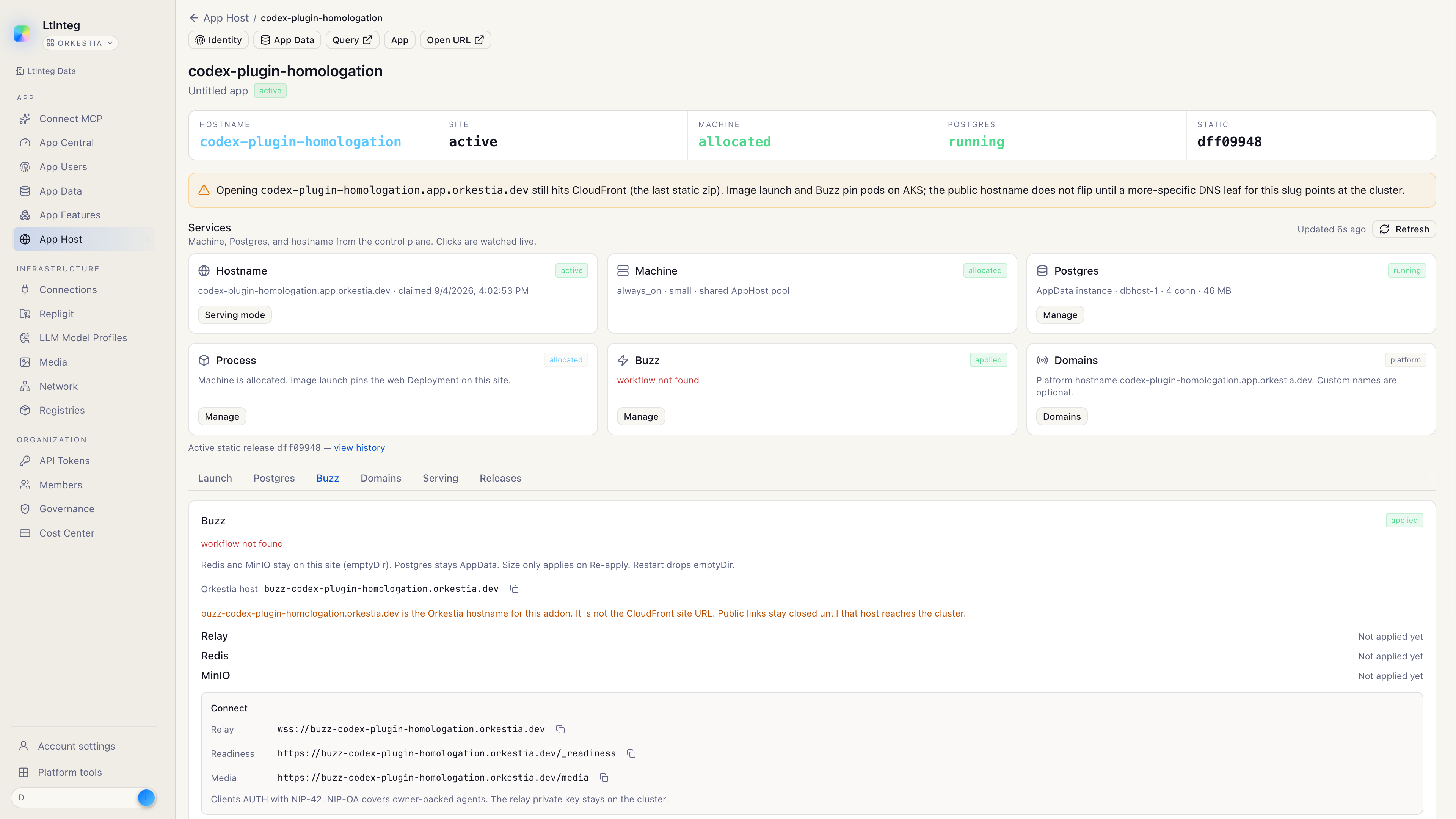
Open the Buzz tab
On the site workspace, click Buzz. The tile shows whether Buzz is applied.
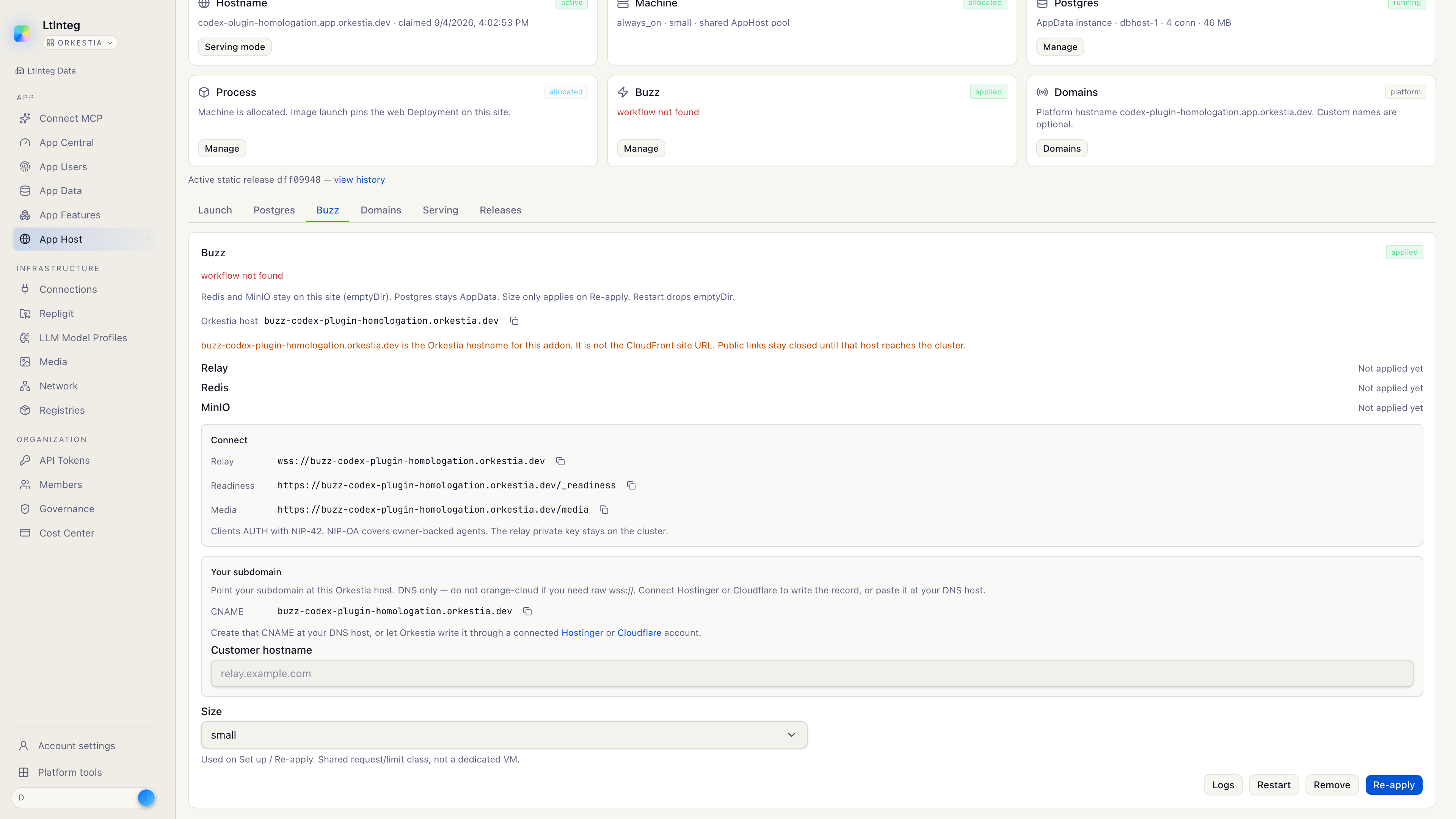
Optional: your subdomain
If you already know the public name clients will use (relay.example.com), enter it as the customer hostname. You will still CNAME that name to the Orkestia host.
Click Set up Buzz
Confirm. Setup forces the Machine always-on and applies the relay. Size (small / medium / large) is stored for this apply; changing the dropdown later only takes effect on Re-apply.
Wait for the host to reach the cluster
The connect recipe (Relay, Readiness, Media) is always visible. Open links stay closed until the Orkestia host answers as the relay — not as the CloudFront website. Readiness is confirmed on the cluster, not by probing the public website host.
When the host is live, Readiness returns:
{ "status": "ready" }
Open https://buzz-<slug>.orkestia.dev/_readiness in a browser to confirm. If you see an HTML page instead, you are on the website host, or DNS has not reached the relay yet.
Connect (no secrets)
The Connect box is what you give a client or an agent.
| Field | Shape | Use |
|---|---|---|
| Relay | wss://buzz-<slug>.orkestia.dev | Websocket URL |
| Readiness | https://buzz-<slug>.orkestia.dev/_readiness | Health check |
| Media | https://buzz-<slug>.orkestia.dev/media | Media base URL |
Authentication is required. Clients AUTH with NIP-42. NIP-OA covers owner-backed agents. The relay private key stays on the cluster. The console will not show it, and you should not ask anyone to paste it.
Manage
| Action | What it does |
|---|---|
| Restart | Restarts relay, Redis, and MinIO. Redis and git pack-cache may reset. MinIO attachments and relay git survive on PVCs. |
| Logs | One-shot tail of the relay. Do not paste logs that might contain user content into a public chat. |
| Remove | Removes Buzz and deletes the MinIO/git PVCs, then leaves the website host pointing at the site process or zip. App Data stays. Files on that MinIO are deleted too. Restart does not destroy volumes. |
| Re-apply | Applies again (needed after you change size, add a customer hostname, or bind a new owner key). |
Statuses you may see:
| Status | Meaning |
|---|---|
| Not applied | Buzz is not on this site yet |
| Applied | Machine is always-on; live pod health may still be catching up |
| Ready | Relay and parts are up, and the public host is the cluster |
| Degraded | Applied, but a part is not ready — use Restart or Logs |
| Cluster only | Pods are up; the public host is not the relay yet |
| Unavailable | Live status is not on this runner yet. Re-apply still works. The tile falls back to the Machine. |
Redis stays emptyDir on this site (may reset). MinIO and relay git use PVCs. Postgres is App Data and is unchanged.
Health is three lights: transport (relay Ready), persistence (App Data instance), agent (end-user agent bound). Chat attachments use this site's MinIO (apphost.addon.object.put / sign-get and Buzz /media with NIP-42), not shared data.appdata.document.*. Org-member app files use the same volume on a different prefix — see Files (apphost.file.*).
What clients must not do
- Do not treat
<slug>.app.orkestia.devas the relay. - Do not expect a pasted
DATABASE_URLor relay key from App Host. - Do not treat Buzz as App Data conversations or as an HTTP Chat Relay.
- Use
buzz-<slug>.orkestia.devas the Orkestia host, then CNAME your subdomain to it.
Related
- Signing keys
- Your own domain
- App Data
- Website and process
- Files — org-member objects on this MinIO